
My daughter has the same thoughts of shopping as I do.
I have to go grocery shopping today. Note that I said have to. It’s not one of my favorite things to do…just not particularly fond of the ritual of deciding what time to go, where to park, how to pick a shopping cart that doesn’t squeak or wobble, maneuvering around other shoppers that prefer to park their cart in the middle of the aisle making it impossible to pass, and hoping I remembered to put everything on my list because I’m sure as heck not doing this again today…or later this week!
Well, there is one thing that has made my life much easier when it comes to grocery shopping and managing my shopping lists…Grocery Gadget. It’s a phone app that stores and manages your shopping lists. It is compatible with iPhone, Blackberry, Nokia, and Android phones. Here are some of the features that I love about Grocery Gadget (but I recommend checking out the video below and the Grocery Gadget website to get a better overview of the product):
- You can create multiple shopping lists for stores you frequently use (for example I have lists for: HEB, Sam’s, Target, WalMart, Lowe’s, Home Depot, etc.)
- Shopping lists can either be created on your computer online or on your phone and they will automatically sync with one another.
- As you create lists, you can indicate the quantity you need of each item plus include the cost or each items and the sales tax amount. Here’s a screenshot of what a list looks like on your account:
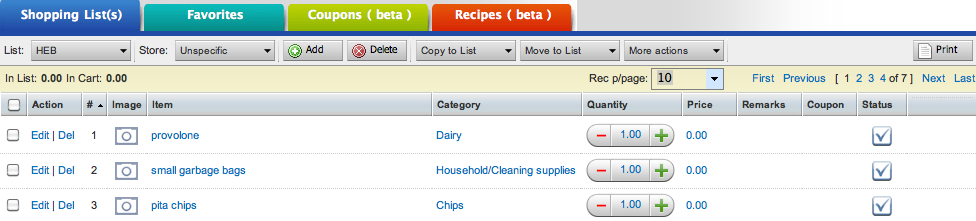
- Items can be categorized by type (Dairy, Bread, Produce, etc.). It’s even smart enough to recognize your items in the order you pick them up and check them off your list!
- When you check items off the list, it will display a running total of your expenses so you know how much you are spending as you shop.
- You can take photos of items to make sure you or your partner gets the right brand of coffee…because the right coffee does make a difference!
- You can establish a group of folks who share and have access to the same account where the lists automatically sync to their devices too. This can be especially handy if you have a spouse, older kids or roommates who share shopping duties with you
- Lists can be emailed to whoever is doing the shopping whether they are in your group or not.
- And…you can add items at any time or as you shop for things you forgot…or are buying on impulse!


{ 1 trackback }